Technology vocabulary is part of daily life vocabulary now, not a specialist topic reserved for engineers. English learners hear words like phone, app, charger, screen, laptop, and password at work, in school, on public transport, and at home. A strong vocabulary for technology and devices helps learners follow instructions, ask for help, solve problems, shop confidently, and join ordinary conversations. In my own ESL teaching work, this is one of the fastest-growing vocabulary areas because students use these words long before they feel fully comfortable with them.
When we talk about technology words, we mean the common English terms used for digital tools, electronic devices, internet services, and basic actions connected to them. Device means a piece of equipment such as a smartphone, tablet, laptop, printer, or smartwatch. Technology includes both the physical item and the system around it, such as software, Wi-Fi, cloud storage, and messaging apps. Daily life vocabulary in this area also includes verbs like charge, download, upload, connect, click, tap, scroll, print, and save. These are not advanced words. They are essential words for modern routines.
This hub article covers the most useful common English words for technology and devices, explains what they mean in plain language, and shows how people actually use them. It also organizes the topic into clear groups, so learners can build vocabulary step by step instead of memorizing random lists. If you want to understand everyday English better, speak more naturally, and handle common digital tasks without confusion, this is the right place to start.
Core device words you hear every day
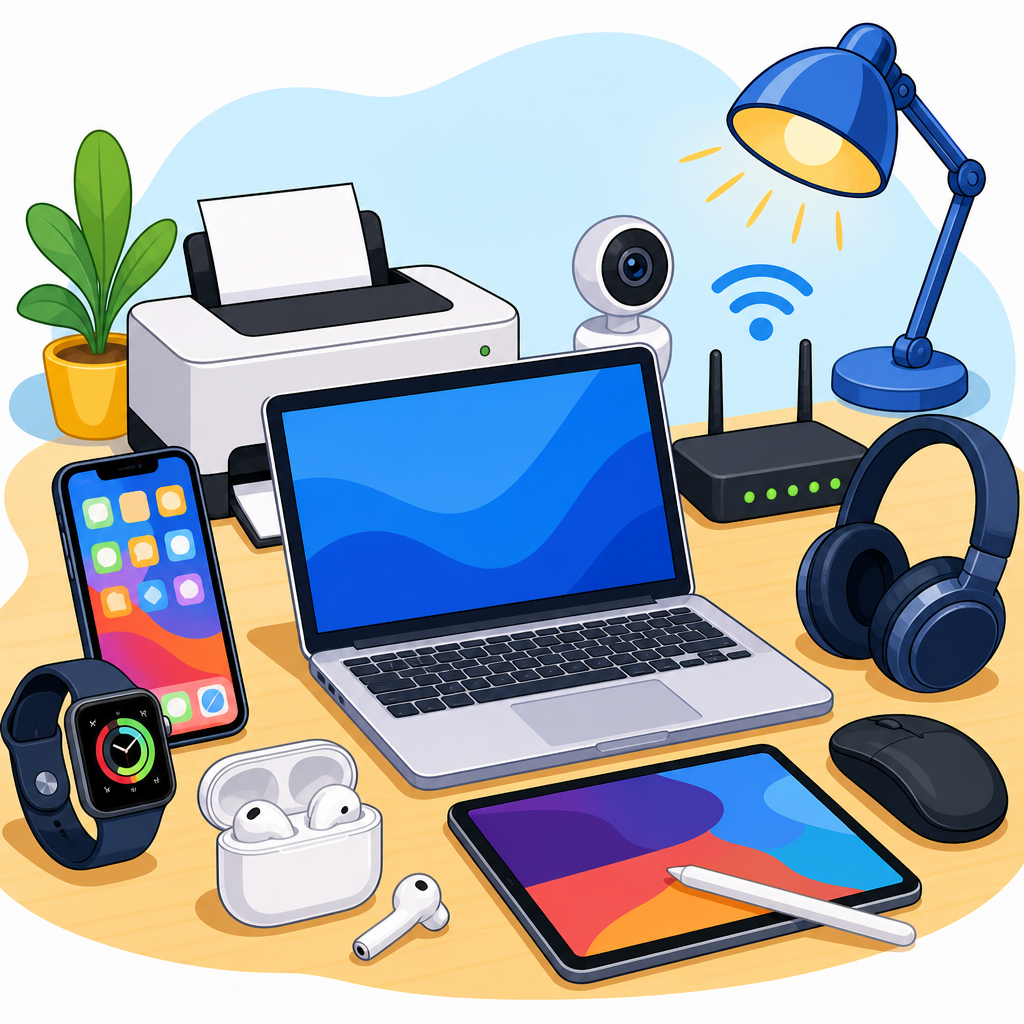
The most important technology words are the names of devices people use constantly. Phone usually means smartphone today, though mobile phone is also common, especially in international English. A smartphone is a phone that connects to the internet and runs apps. Laptop is a portable computer with a screen and keyboard attached. Desktop means a computer kept on a desk, often with a separate monitor, keyboard, and mouse. Tablet is a flat touch-screen device larger than a phone but smaller than many laptops. Smartwatch is a watch that connects to a phone and shows messages, health data, or notifications.
Other common device words appear in homes, offices, and classrooms. A monitor is the screen connected to a computer. Headphones cover the ears, while earbuds fit inside them. A speaker plays sound aloud. A keyboard is used for typing, and a mouse controls the pointer on a screen. A printer produces paper copies, and a scanner copies paper documents into digital files. A charger supplies power to a device battery. A cable connects devices physically. A router shares internet access, and a webcam is a camera used with a computer for video calls.
Students often mix up screen, monitor, and display. In simple use, screen is the most general word. You can say phone screen, laptop screen, or computer screen. Monitor usually refers to the separate screen used with a desktop computer. Display is slightly more technical and appears in instructions, product descriptions, and settings menus. In class, I tell learners to begin with screen for everyday speech, then add monitor and display as they see them in real situations.
Parts of devices and the words users need
Knowing device names is not enough. Real conversations often focus on parts. Battery is one of the most important words because people constantly talk about battery life, low battery, battery percentage, and battery problems. Camera, microphone, speaker, button, port, lens, case, and cover are also frequent. Port means the place where you plug in a cable, such as a USB-C port or headphone jack. Storage refers to the space available for files, photos, videos, and apps. Memory is common too, though in everyday speech many people use it loosely to mean storage, even if the technical meaning differs.
English learners should also know lock screen, home screen, keyboard layout, touchpad, fingerprint sensor, and power button. These terms appear when someone gives help: “Press the power button,” “Swipe up from the lock screen,” or “Your fingerprint sensor is dirty.” Another useful group includes SIM card, SD card, hard drive, solid-state drive, and motherboard. Not every learner needs all of these immediately, but they become useful when buying devices, describing problems, or reading simple repair instructions.
A practical tip is to learn vocabulary in phrases rather than isolated nouns. Native speakers usually say cracked screen, dead battery, slow charger, wireless mouse, front camera, back camera, and full storage. These combinations matter because they reflect how English is actually used. If a learner knows battery but not dead battery, communication remains incomplete. Phrase-based learning builds faster comprehension and more natural speaking.
Common actions: what people do with technology
Technology vocabulary includes many high-frequency verbs. Turn on and switch on mean start a device. Turn off and switch off mean stop it. Charge means give power to a battery. Plug in means connect a cable to power or another device. Connect can refer to cables, Bluetooth, Wi-Fi, or account access. Click is used with a mouse or trackpad, tap with a touchscreen, press with a button, and swipe when moving a finger across a screen. Scroll means move up or down through content. Type means enter words with a keyboard, and enter can mean type information or confirm it.
Download and upload are basic but often confused. Download means move data from the internet or another system to your device. Upload means send data from your device to a website, app, or cloud service. Save means keep a file, while delete means remove it. Share means send content to another person or platform. Search means look for information, and browse means look through content less directly. Stream means watch or listen without fully downloading the file first. Sync means keep data updated across devices, such as contacts syncing from a phone to a laptop.
These verbs matter because instructions rely on them. A teacher might say, “Download the worksheet, open the file, and upload your answer.” A coworker might say, “Charge your headset and connect it before the meeting.” A friend might say, “Scroll down, tap the link, and save the photo.” Learners who know the actions can follow real-world English faster than learners who only know object names.
| Word | Meaning in plain English | Example sentence |
|---|---|---|
| download | move a file to your device | I downloaded the app on my phone. |
| upload | send a file from your device | Please upload your document before class. |
| charge | give battery power to a device | I need to charge my laptop. |
| scroll | move through content on a screen | Scroll down to read the comments. |
| sync | update the same data across devices | My calendar syncs with my phone and tablet. |
Internet, apps, and communication vocabulary
Modern device use is deeply connected to internet vocabulary. Wi-Fi is the wireless system that connects devices to the internet. Signal refers to connection strength. Password is the secret word or code used for access. Username is the account name. Login and sign in usually mean enter an account, while log out and sign out mean leave it. Browser means the program used to visit websites, such as Google Chrome, Safari, Microsoft Edge, or Firefox. Website, link, tab, homepage, and search bar are all core daily vocabulary items.
App, short for application, is one of the most common technology words in English. People install, update, open, close, and delete apps. Popular examples help learners remember usage: WhatsApp for messaging, Zoom for meetings, Google Maps for directions, Spotify for music, and Gmail for email. Email itself creates more vocabulary: inbox, attachment, reply, forward, spam, draft, and subject line. For messaging, learners should know text, message, voice note, group chat, emoji, and notification.
Video communication deserves special attention because it changed work and study routines worldwide. On platforms like Zoom, Microsoft Teams, and Google Meet, users mute and unmute microphones, turn cameras on and off, share screens, join calls, leave meetings, and send links. These are common English tasks, not niche business terms. A learner who understands “You’re on mute” or “Can you share your screen?” can participate much more confidently in school and workplace settings.
Vocabulary for common problems and simple troubleshooting
Many technology conversations happen because something is wrong. That is why problem vocabulary belongs in any serious daily life vocabulary hub. Slow, frozen, broken, dead, full, offline, disconnected, and outdated are key adjectives. A slow laptop works but responds poorly. A frozen screen stops responding. A broken charger does not work physically or electrically. A dead phone has no battery power. Full storage means there is no more space for files. Offline means not connected to the internet or network. Outdated software is old and may need an update.
Simple troubleshooting language follows patterns. Restart means turn a device off and on again. Reset can mean return settings to an earlier state. Update means install a newer software version. Install means put software onto a device; uninstall means remove it. Pair is used for Bluetooth connections, such as pairing wireless earbuds with a phone. Users also clear cache, free up storage, change settings, and check permissions. Permission means an app is allowed to use features like the camera, microphone, contacts, or location.
In practical English, clear descriptions save time. Compare “My phone is bad” with “My phone battery dies quickly, and the screen freezes when I open the camera.” The second sentence is far more useful. I encourage learners to memorize short repair phrases such as “It won’t turn on,” “The Wi-Fi keeps dropping,” “The app crashed,” “The file won’t open,” and “I forgot my password.” These are the exact sentences people need in stores, offices, schools, and support chats.
Shopping for devices and understanding product language
Buying technology requires another layer of vocabulary. Price, budget, model, brand, warranty, refurbished, new, used, and compatible are central terms. A model is the specific version of a product. Brand means the company, such as Apple, Samsung, Lenovo, Dell, HP, or Sony. Warranty is the company’s promise to repair or replace under certain conditions. Refurbished means a used product that has been tested and repaired for resale. Compatible means it works correctly with another device, cable, operating system, or accessory.
Specifications often look difficult, but several words appear repeatedly. Screen size is measured in inches. Resolution describes screen clarity, with terms like Full HD or 4K. RAM affects how smoothly tasks run, while storage capacity is measured in gigabytes or terabytes. Battery life is often given in hours, though real performance depends on screen brightness, software, and usage. Operating system means the main software environment, such as Windows, macOS, Android, or iOS. Processor, chip, and performance are common when comparing laptops and phones.
Shoppers should also understand tradeoffs. A cheaper laptop may offer lower battery life, less RAM, or a dimmer display. A lightweight tablet may be easier to carry but harder to type on for long periods. Wireless earbuds are convenient, but tiny batteries wear down over time. Knowing vocabulary helps learners ask better questions: “Is this charger compatible with my phone?” “How much storage does this model have?” “Does the warranty cover battery problems?” Good vocabulary leads directly to better decisions.
How to learn and remember technology vocabulary effectively
The best way to learn common English words for technology and devices is through use, not memorization alone. Start with your own daily routine. Label the items you touch every day: phone, screen, charger, cable, keyboard, headphones, app, password, and Wi-Fi. Then learn the actions connected to them: unlock, tap, type, search, save, send, charge, and update. This creates a practical vocabulary network that matches real life.
Next, collect language from authentic sources. Read device settings, app menus, online shopping pages, and simple help articles. Listen carefully during video calls and tech support conversations. If you hear a repeated phrase like low battery, weak signal, software update, or share your screen, write it down as a chunk. Spaced repetition tools such as Anki or Quizlet can help, but they work best when the cards include full phrases and personal examples rather than single translated words.
Finally, practice speaking in realistic situations. Describe your device, explain a problem, compare two products, or tell someone how to connect to Wi-Fi. Daily life vocabulary becomes active only when you use it to do something meaningful. Build from the most common words outward, review them in context, and keep adding examples from your own devices. If you want stronger ESL vocabulary building, start with the words on your desk, in your pocket, and on your screen today.
Frequently Asked Questions
1. Why is technology vocabulary important for English learners today?
Technology vocabulary is important because it is no longer limited to computer experts or engineers. Words such as phone, app, screen, charger, laptop, tablet, password, and wifi appear in everyday life almost everywhere. English learners hear and use these words at work, at school, in shops, on public transport, in banks, in airports, and at home. If a learner does not understand basic technology words, many ordinary tasks become harder than they should be. For example, it is difficult to follow instructions like “download the app,” “turn on your microphone,” “charge your phone,” or “enter your password” without this vocabulary.
A strong technology vocabulary also helps learners become more independent and confident. They can ask clear questions, understand device instructions, explain simple problems, and take part in normal conversations with friends, classmates, coworkers, and customer service staff. In modern life, technology words are part of general English, not just specialist English. That is why learning common device and technology vocabulary is one of the most practical steps an English learner can take.
2. What are the most common English words for technology and devices that beginners should learn first?
Beginners should start with the words they see and use most often in daily life. A good first group includes the names of devices: phone, smartphone, computer, laptop, tablet, headphones, keyboard, mouse, screen, and printer. These words are basic, useful, and easy to connect to real objects. Learners should also study common accessory words such as charger, cable, battery, plug, and adapter, because these come up often when charging devices or solving simple problems.
After that, learners should focus on action words and everyday digital terms such as click, tap, scroll, download, upload, log in, sign in, search, save, delete, and print. It is also essential to know common words related to internet use and security, including app, website, wifi, username, password, account, and settings. These are high-frequency words that learners can use immediately in real situations, which makes them the best starting point for building practical technology vocabulary.
3. How can English learners use technology words correctly in everyday conversations?
The best way to use technology words correctly is to learn them in natural phrases, not as isolated vocabulary items. For example, instead of memorizing only the word charger, it is more useful to learn sentences such as “I need my charger,” “My charger is in my bag,” or “Can I borrow a charger?” Instead of learning only password, learners can practice “I forgot my password,” “What is the wifi password?” or “Please enter your password.” This approach helps learners understand how the word works in real communication and makes it easier to remember.
It is also helpful to practice common situations. A learner might say, “My phone battery is low,” “The screen is broken,” “I can’t log in,” “The app isn’t working,” or “Can you help me connect to wifi?” These are simple, high-value expressions that appear in daily life again and again. Listening to native speakers, reading device menus, and paying attention to everyday instructions can also improve accuracy. Over time, learners begin to notice which words are more common in speech, which are more formal, and which are used in specific contexts. Regular practice with short, realistic sentences is the fastest way to sound natural and confident.
4. What is the difference between similar technology words like app, program, software, device, and gadget?
These words are related, but they are not always interchangeable. An app usually refers to a small software application, especially on a phone or tablet, although people also use the word for computer applications. A program often refers to software on a computer and can sound slightly more traditional or technical. Software is the broad general term for the digital programs and systems that run on a device. In simple terms, an app is a type of software, and a program is also a type of software.
A device is a physical piece of technology, such as a phone, laptop, tablet, or smartwatch. It is a practical, neutral, and very common word. A gadget also means a device, but it often suggests something clever, modern, small, or interesting. For example, a smartwatch might be called a gadget, but in many daily situations people are more likely to say device. English learners should understand these differences because choosing the right word makes communication clearer. If you say “I installed new software on my device,” that sounds natural and general. If you say “I downloaded an app on my phone,” that sounds specific and precise. Learning these distinctions helps learners speak more accurately and understand others more easily.
5. What are the best ways to remember and expand technology vocabulary quickly?
One of the most effective methods is to connect words directly to real life. Learners should label the technology they use every day: screen, keyboard, charger, camera, microphone, speaker, and battery. They can also change their phone or computer language settings to English if their level allows it. This creates constant exposure to useful words like settings, notifications, privacy, update, and storage. Repeated exposure in a real context helps vocabulary stay in memory much better than memorizing word lists alone.
Another strong strategy is to organize vocabulary by situation instead of by alphabet. For example, learners can create groups such as “using the internet,” “video calls,” “phone problems,” “shopping for electronics,” or “computer actions.” In each group, they can learn both nouns and useful phrases, such as “connect to wifi,” “charge the battery,” “restart the laptop,” “open the app,” or “reset the password.” Speaking and writing practice are also important. Learners should make short sentences, ask and answer simple questions, and repeat common expressions aloud. If they combine repetition, real-world use, and topic-based study, their technology vocabulary will grow quickly and become active, not just passive, knowledge.